
App Cloner Premium & Add-ons
App ListoLibraries & Demo
1.9881.00 Reviews
- Version
- 3.4.0
- Installs
- 5.00M
- Age Rating
- Everyone
Screenshots
Our Review of App Cloner Premium & Add-ons
 Analysis by Appyee
I’m cautious about tools that create extra versions of other apps, because convenience is only useful if I can keep track of which copy I’m using and what I’m allowing it to do. App Cloner Premium & Add-ons is an Android utility from App Listo, listed among library and demo tools. Its basic appeal is practical: make a separate copy of an app so two instances can be used on one device. That can help with divided work and personal accounts, but it also means taking responsibility for copies that may behave differently from their originals.
What cloning changes—and what it does not
Cloning is not the same as installing a second official version from an app’s publisher. The new copy is created from an existing app, so compatibility and behavior can depend on that particular app and on the Android device. I would treat each clone as a separate experiment rather than assume it will inherit every update, login flow, or security feature exactly as the original does.
The distinction matters most when an app handles sensitive information. A messaging or social account may be convenient to separate, while a banking, identity, or work app may rely on checks that reject a modified or additional installation. Before depending on a clone, I would test the specific task I need, then keep the original available until I know the copy behaves as expected.
Practical controls and everyday choices
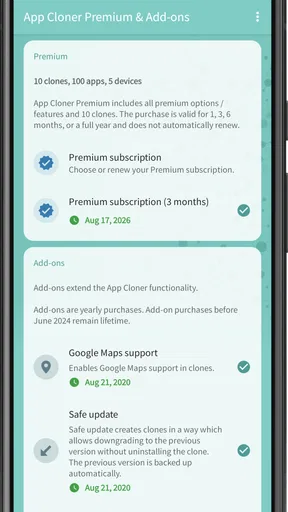
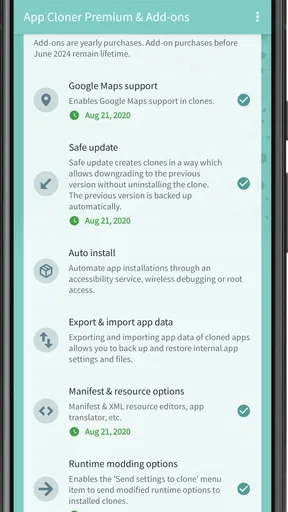
The published feature set describes customization such as changing a clone’s name or icon, and it mentions options including password protection and incognito mode among premium add-ons. Those choices can make a set of copies easier to recognize and may suit someone who wants a more private-looking app drawer. They do not, by themselves, tell me what information an app collects or guarantee that the cloned app has the same privacy behavior as its original.
I would use a distinct name and icon for each copy rather than making clones look identical. It is a small organizational habit with a real payoff: when a notification arrives or I open an app in a hurry, I can tell whether I am entering a personal or work account. If a clone has a protection option, I would still use the device’s normal security settings and avoid treating an extra app-level barrier as a substitute for them.
There is also a useful stopping rule: clone only when separate sessions solve a recurring problem. If I merely need to switch accounts occasionally, signing out and back in, using an app’s built-in account switcher, or using a separate official app may be simpler and less prone to compatibility surprises. The convenience of parallel copies is strongest when the accounts are used often enough to justify maintaining both.
Where trust deserves a closer look
I would pay attention to the permissions requested by the original app and by any clone during setup and use. Permissions are a concrete place to make a choice: grant only what is needed for the task, and reconsider if an app asks for access that does not make sense for its purpose. A cloned app is still the app being cloned, so its requests should be judged on their own merits rather than assumed safe because it runs through a cloning tool.
Account control matters too. A second copy can make it easier to keep two logins open, but it does not make either account independent of its provider’s rules. Some services may restrict simultaneous sessions or refuse modified copies. I would avoid using cloning to bypass an account limit, disguise activity, or put someone else’s account at risk; if a provider offers a supported multi-account option, that is usually the more dependable route.
The app is free to install, is marked for everyone, and has an average rating of 1.9 from around 27,000 ratings, with roughly 881 written reviews. Those figures make me cautious rather than dismissive: they are a reason to read recent user feedback and test a low-stakes app first, not proof that a particular device or clone will fail. It has passed five million installs, but popularity alone cannot settle whether the tool is suitable for a sensitive workflow.
A realistic way to test it
Imagine I use one social app for a local club and another account for personal messages. I would first check whether the app itself already supports switching accounts. If it does not, I could try a clone for the club account, give it a clearly different name, and verify that notifications, sign-in, and the specific features I rely on work. I would keep the original account untouched during that trial and avoid moving important conversations or files until I was confident the copy was reliable.
That test also helps answer the practical questions people often have: will every app clone, will it keep working after an update, and can I use two accounts at once? There is no universal answer because the result depends on the target app and device. The sensible approach is to try one nonessential app, check the behavior after normal use, and expect to repeat that check if the original app changes significantly.
For people who manage several accounts every day, the time saved by leaving sessions open may be worthwhile. For occasional account switching, the extra copy can add clutter and another place to check for notifications. I would also be careful with storage and battery expectations: each installed copy adds another app instance to manage, even if the exact impact varies by what it does and how often it runs.
Who is likely to benefit
This tool makes the most sense for Android users who understand the difference between a clone and an official second app, have a repeated need for separate sessions, and are comfortable troubleshooting if a target app behaves oddly. A small business owner keeping personal and customer-facing accounts apart, or a volunteer handling a community account alongside their own, has a clear reason to test the workflow.
It is a weaker fit for anyone who wants a guaranteed way to duplicate every app, needs uninterrupted access to a security-critical service, or does not want to manage extra copies. In those cases, an app’s own account switcher, a separate official client, or simply signing in and out may be safer and easier. I would not choose a cloning tool as the foundation of a banking or authentication setup.
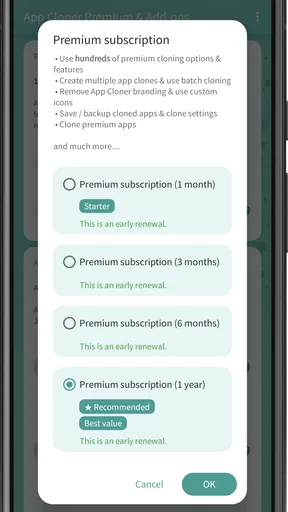
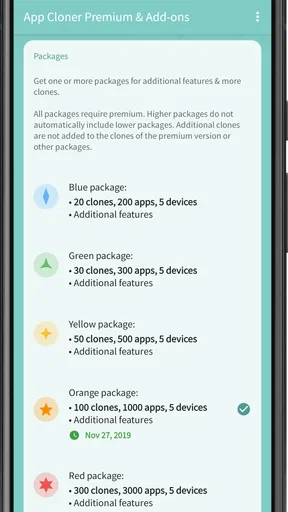
The current version is 3.3.0, and it requires Android 5.0 or later. Premium purchases and add-ons are offered as in-app purchases, with listed items ranging from about ten dollars to around 320 dollars. That is a wide spread, so I would inspect the particular add-on and its cost before buying rather than assume every customization is included at no charge. For a first try, I would establish whether the free experience handles the one app I care about before considering extras.
How it compares with familiar alternatives
Compared with built-in account switching, cloning prioritizes keeping separate instances available rather than moving between profiles inside one app. That can be more convenient when I need both accounts active, but the built-in route is usually less complicated and is more likely to be supported by the app maker. Compared with installing an official work or secondary edition, a clone offers flexibility but may not receive the same compatibility assurances.
There is a trade-off between customization and predictability. Renaming a copy or choosing a distinct icon can make daily use clearer, while deeper modifications may make a target app less willing to run or update normally. I would make one change at a time, test the result, and avoid changing several settings before I know which one caused a problem. That simple method makes troubleshooting much less frustrating.
I would also keep a short mental inventory of what I have cloned and why. If I stop using an account, removing its clone can reduce confusion; before doing so, I would check that anything important is synced or otherwise saved through the app’s normal means. A clone should not be treated as a backup, and having two installations does not automatically protect account data if one becomes unavailable.
One limitation is that the experience cannot be judged from the cloning tool alone: the app being copied has a major say in whether the result works. Security checks, sign-in requirements, and updates can all change the outcome. Another is the temptation to interpret privacy-oriented options as a full privacy guarantee. I see them as user controls, not a substitute for reviewing permissions, account settings, and the policies of the services I choose to run.
App Cloner has been available since November 17, 2018, and its developer is App Listo. I would still evaluate it based on my current device and the exact app I want to duplicate, rather than assuming its age or install count ensures compatibility. The low average rating is a clear prompt to proceed carefully, especially if I depend on a clone for something important.
A cautious verdict for the right kind of user
My recommendation is conditional: this can be a useful experiment for someone who routinely keeps two accounts active and is willing to test each target app. Start with a low-risk use, label the copy clearly, check its permissions and sign-in behavior, and keep the original intact until the clone has proven itself. If the app refuses to work or an account provider offers a supported alternative, I would use that instead of trying to force the clone.
I would skip it for critical financial, identity, or security workflows, and for anyone expecting every app to duplicate cleanly with no maintenance. For a casual user who only needs an occasional account switch, the simpler option is probably better. For a careful tinkerer with a genuine need for parallel sessions, App Cloner Premium & Add-ons may earn a place on the device, but I would treat every clone as a separate app to evaluate—not as a guaranteed mirror of the original.
First Impressions: What Exactly Does It Do?
So, what’s the deal with App Cloner? Essentially, this tool allows you to create multiple copies of your favorite apps. Each clone is independent of the original app, meaning you can tweak settings, change features, and even modify the app's appearance. It’s like having a digital Swiss Army knife for app enthusiasts.
The setup process is straightforward. Once you download and install the app, you’re greeted with a clean interface that guides you through the cloning process. It’s pretty intuitive, so even if you’re not a tech wizard, you should have no trouble getting started.
Customization Options Galore
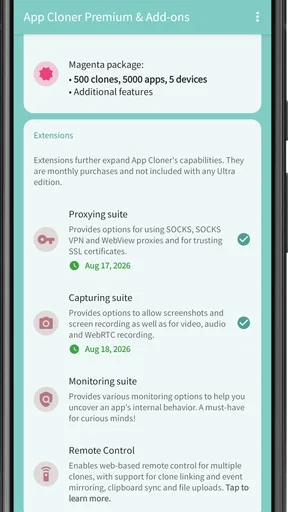
This is where things get exciting. The customization options are vast. Want to change the app icon? Done. Need to rename the app? Easy peasy. You can even tweak permissions, which is a game-changer if you’re concerned about privacy. The premium version unlocks a treasure trove of add-ons, allowing for even deeper customization like password protection for cloned apps or even incognito mode.
Using these features feels empowering. Imagine being able to use multiple accounts on the same app without having to log out and in repeatedly. It's a dream come true for social media mavens or anyone managing multiple business accounts.
Performance and Reliability
Now, I was a bit skeptical about how well these cloned apps would perform. Would they crash? Would they slow down my phone? I’m happy to report that, for the most part, they run as smoothly as the originals. Of course, this can depend on your device and the app you’re cloning, but I experienced very few hiccups.
The app is regularly updated, which is reassuring. The developers are clearly committed to ironing out any bugs and keeping the app compatible with the latest Android updates.
Considerations and Final Thoughts
While App Cloner is a powerful tool, it’s not without its quirks. Some apps, particularly those with stringent security measures like banking apps, may not clone successfully. This is not a fault of App Cloner but rather a testament to the security protocols of those apps.
In conclusion, if you’re someone who loves to tinker with your devices or needs to manage multiple app accounts, App Cloner is definitely worth considering. It’s a robust, reliable tool that opens up a world of possibilities. Just make sure to play around with the free version first to get a feel for what it can do. Trust me, once you see the potential, you might just find it indispensable.
Verdict
Strengths of App Cloner Premium & Add-ons
- Allows multiple app instances.
- Highly customizable interface.
- Ad-free experience.
- Supports cloning almost any app.
- Frequent updates for new features.
Limitations of App Cloner Premium & Add-ons
- Some apps may not clone successfully.
- Requires paid version for advanced features.
- Limited support for some games.
- Can be complex for beginners.
- Occasional stability issues.
Similar Picks in This Category
View All
PGT: GFX, Launcher & Optimizer
Trilokia Inc.4.5

AusweisApp Bund
Governikus Service GmbH3.7

Cardboard
Google LLC3.2

Gamers GLTool with Game Tuner
Trilokia Inc.4.5

Multi Web Chat - Read Secretly
World Scan & Cleaner3.8

Holy Quran Offline Reading
JedyApps4.4
Frequently Asked Questions
What is App Cloner Premium & Add-ons?
App Cloner Premium & Add-ons is a versatile tool that allows users to create and install multiple copies of their existing apps on their Android devices. This can be particularly useful for managing multiple accounts or customizing the app's appearance and functionality without affecting the original app.
How does App Cloner ensure the safety and security of cloned apps?
App Cloner takes security seriously by ensuring that cloned apps are sandboxed, preventing them from accessing data from the original app. However, it is essential to download the app from reputable sources and be mindful of the permissions granted to cloned apps to maintain optimal security.
Are there any limitations on the types of apps that can be cloned?
While App Cloner supports cloning a wide range of apps, certain applications, particularly those with strict security measures like banking or communication apps, may not be cloneable. Additionally, some apps may not function correctly once cloned due to restrictions imposed by the original developers.
What are the main benefits of using the Premium version of App Cloner?
The Premium version of App Cloner offers advanced features such as customization options for app icons and names, the ability to change permissions, and additional cloning options. This version supports more apps and offers a more comprehensive experience, making it worthwhile for users seeking enhanced functionality and flexibility.
How can users troubleshoot issues with cloned apps?
If users encounter issues with cloned apps, they should first ensure they are using the latest version of App Cloner. Re-cloning the app with different settings may resolve compatibility issues. Additionally, checking online forums or the app's support page can provide solutions from other users facing similar challenges.
